
OCB Grants are provided to nonprofit organizations that:
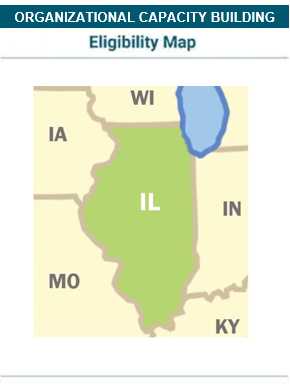
- are located and serving individuals in Illinois;
- have been in operation for at least three years; and
- have annual revenue of at least $75,000
General Grant Exclusions
RRF generally does not fund:
- Projects that are not intentionally focused on older people, age 60 and above
- Projects outside of the United States
- Grants to individuals
- Projects based in institutional settings, including hospitals, rehabilitation, assisted living, skilled care facilities, and other healthcare settings
- Lobbying
- General operating expenses or support for ongoing programs without significant changes in strategy or focus
- Biomedical research, basic theory development for social science research, or research and development for new technology
- Construction of facilities, capital improvements, or computer equipment
- Conferences, publications, or production of films and videos unless they are integral components of a larger project
- Dissertation research, tuition expenses, or education programs for undergraduate or graduate students
- Endowments, capital campaigns, or fundraising events
- Private foundations
- Financial deficits
Beginning in Fall of 2026, all prospective OCB applicants are required to submit a brief project description before being invited to submit a grant application.
Applications for OCB Grants are accepted on a rolling basis throughout the year. Funding requests must be no more than $15,000. Decisions on OCB Grant applications are generally made within four to seven weeks. Grants are awarded for a six-month period.
RRF’s OCB application process first requires submission of a brief email confirming the project and organization meets RRF’s eligibility criteria. All prompts are listed under Step 3 – Complete Eligibility Screener.
Beginning in September 2026, interested applicants will be required to first submit a brief outline of their organizational capacity building project to ensure their request is eligible for consideration.

- Share your organization name and EIN/Tax ID number.
- Which category of eligible OCB-funded activities best fits this project?
- Board Development
- Communications and Marketing
- Evaluation
- Fundraising
- Human Resources
- Internal Operations/Financial Management
- Organizational Strategy Planning
- Staff training specifically focused on serving older people
- Strategic Program Planning
- Information Technology Improvements
- Provide 1-3 sentences describing the capacity building request.
- Example OCB project descriptions can be found on RRF’s Grant History webpage.
If you are invited to submit a full OCB proposal, you will be sent an email with detailed instructions to navigate RRF’s application process.
OCB applications must be submitted via RRF’s online applications portal. Applicants must be able to explain how the grant will have a direct connection to the organization’s ability to better serve older people.
OCB Grants are often used to support consultants, and if so, a bid and scope of work must be submitted with the application.
Please provide the following in your application:
Organizational Information
- Legal Name, Employer ID Number (EIN)
- Address, Phone Number
- Year Incorporated
- Current Fiscal Year Budget (Revenue)
- Number of Full-Time Equivalent Staff
- Organization Mission Statement
- Total Number of Clients Served Annually (estimate)
- Percent of clients age 60+ (estimate)
Contact Information
- Name, Office Address, Email, and Office Phone Number for the project’s Primary Contact, and an Organization Contact (responsible for authorizing a Grant Award).
Project Information
- Amount Requested of RRF (maximum of $15,000)
- Estimated Total Project Cost
- Project Start Date
Proposal Attachments
Project Narrative
- In approximately one page (Word file), answer the following questions:
- Describe the capacity building request. Why is this needed now?
- If you plan to use funds to hire a consultant, explain how and why this specific consultant was chosen.
- How will this project directly impact the organization’s ability to serve older people?
- Describe the capacity building request. Why is this needed now?
Project Budget
- Attach a summary budget for this budget. Upload as an Excel file. A sample template can be downloaded here.
Consultant/Technical Assistance Provider Information (if applicable)
- If you plan to use funds to hire a consultant, please attach a project bid/scope of work that includes estimated costs.
Additional Attachments – Please include the following:
- A copy of the IRS Letter documenting your organization’s tax exempt status;
- Most recent audited financial statement – or a copy of your organization’s most recent IRS 990 form.
Fiscal Agent Attachments (if Applicable)
If your organization uses a fiscal agent, RRF also requires the following attachments:
- A copy of the written agreement between the applicant and fiscal agent organizations. This document should include a signature from the fiscal agent’s CEO (or equivalent) and a signature from the applicant organization’s CEO (or equivalent).
- A copy of the fiscal agent’s IRS Letter of Determination
- A copy of the fiscal agent’s most recent audited financial statement or 990 PF.
RRF has an online process to submit grant requests.
Please read the following instructions carefully before beginning a new online application. RRF recommends printing or saving these instructions for reference when continuing work on an application.
Submitting Your Application:
Your team’s invitation email will include instructions to access RRF’s online application portal. Once you sign in or create an account, a new online application form will be created. When you finish a section of the form, click on the Next button displayed at the bottom of the screen to continue to the next section.
If your team does not complete an online application in one sitting, you can re-access the application portal via the Continue an Application button on the right-hand sidebar of this webpage. 
Tips for Continuing to Work on an RRF Online Application:
Please note inactive applications will be purged from our system following 120 days of inactivity.
To continue working on an RRF online application form, click on the Continue an Application sidebar button.
If you have multiple application forms listed, please delete each blank, unneeded form by clicking on “Manage” displayed to the bottom right of the application form’s listing, followed by “Delete.“
If you encounter issues or have any unanswered questions, please contact RRF Foundation for Aging at 773-714-8080 or via email.
Due dates for all grant reports are listed on page four of the RRF Grant Award Letters sent to applicants who are awarded grants.
Grantees will submit their reports electronically via the applicable report form(s) uploaded into the grantees’ RRF Online Applications and Requirements accounts. Grantees will receive an email notifying them when the applicable report form(s) have been uploaded into their account. In addition, they will receive instructions about how to access the forms via an RRF Online Applications and Requirements Account.
Documents describing the information to be included in the grant report(s) may be accessed via the link below: